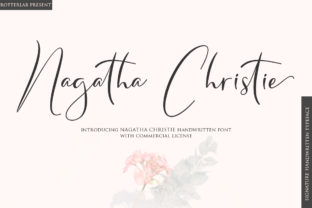
Nagatha Christie: A Handwritten Font That Elevates Real-World Design Work
When you’re finalizing a wedding invitation, designing a boutique product label, or crafting a heartfelt thank-you card for a client, typography isn’t just about legibility—it’s about emotional resonance. Nagatha Christie is a stunning handwritten font that delivers precisely that: warmth, authenticity, and quiet confidence in every curve and stroke. It’s not a decorative flourish meant for one-off headlines. Instead, Nagatha Christie functions as a reliable, expressive tool—one that integrates meaningfully into design workflows where tone, trust, and personality matter.
Where Nagatha Christie Fits in the Design Process
Unlike system fonts or generic script typefaces, Nagatha Christie was built with intention—its letterforms balance rhythm and variation without sacrificing readability. That makes it especially effective during the refinement phase of a project, after layout structure is locked in but before final export. You don’t need to use it from day one—but when you do introduce it, it often signals a shift from functional to felt: from “this works” to “this connects.”
For example, a small business owner designing a seasonal menu might start with clean sans-serifs for section headers and body copy. Only when the hierarchy feels balanced—and the mood still needs softening—does Nagatha Christie enter the frame: applied to dish descriptions, special notes, or the restaurant’s tagline. That timing matters. Introducing it too early can distract; introducing it too late can feel like an afterthought.
Using Nagatha Christie Before, During, and After Creative Execution
Before: Preparation is key. Nagatha Christie includes OpenType features like contextual alternates and ligatures—tools that add nuance without manual tweaking. Before opening your design file, test how the font behaves in your intended software (Adobe Illustrator, Affinity Designer, or even modern web editors). Confirm that your version supports these features and that your platform renders them correctly. If you’re planning web use, verify licensing covers @font-face embedding and check fallback options for slower-loading scenarios.
During: Nagatha Christie shines in layered composition. Use it selectively—not as a full-body font, but where voice matters most. Think: a single line of hand-lettered text on a book cover, a signature-style credit on a podcast graphic, or a subtle watermark on a digital workbook. Its natural flow encourages restraint: overuse dilutes impact, while thoughtful placement reinforces clarity and intention.
After: Post-delivery, consider consistency across touchpoints. If you’ve used Nagatha Christie in a printed brochure, carry its spirit—not necessarily the exact font—into email headers or social posts via complementary spacing, line weights, or color treatment. This maintains cohesion without compromising platform constraints or accessibility standards.
Compatibility and Practical Integration
Nagatha Christie works best alongside type families that share its humanist sensibility but offer contrast in weight and structure. Pair it with a warm, low-contrast serif (like Cormorant Garamond) for editorial layouts—or a friendly, rounded sans-serif (like Quicksand or Nunito) for digital interfaces. Avoid pairing it with rigid geometric fonts or ultra-thin displays; those clash tonally and visually.
File format matters too. For print, use OTF or TTF with embedded subsets if sending to a printer. For web, generate WOFF2 files and define font-display: swap in CSS to prevent invisible text during load. And always test rendering on both macOS and Windows—handwritten fonts can appear slightly heavier or lighter depending on OS-level hinting.
Workflow Examples Across Roles
- Freelance designers: Keep Nagatha Christie in a “tone-shifting” folder within your asset library. When a client says, “Make it feel more personal,” pull it out—not as a replacement for your core branding fonts, but as a targeted adjustment to specific elements like testimonials or call-to-action buttons.
- Educators and course creators: Use Nagatha Christie for handwritten-style annotations in slide decks or PDF workbooks—especially when illustrating thought processes, margin notes, or reflective prompts. Its organic texture helps signal “this is yours to engage with,” not “this is fixed content.”
- Small business owners: Apply Nagatha Christie to limited-edition packaging, holiday cards, or loyalty program certificates. Because it carries craft and care, it subtly communicates investment—in relationships, not just transactions.
- Bloggers and content marketers: Reserve it for quote graphics, email subject lines (where supported), or featured pull-outs in long-form posts. Its visual pause gives readers permission to slow down—a rare and valuable moment in fast-scrolling feeds.
Quality Control and Long-Term Usability
Because Nagatha Christie relies on expressive variation, proofing becomes more nuanced. Check for unintended glyph collisions at smaller sizes, especially around punctuation or ampersands. Zoom in on exported PDFs or PNGs—not just your design canvas—to catch subtle kerning shifts or inconsistent baseline alignment.
Also consider longevity. Handwritten fonts can date quickly if overused in trends (e.g., excessive flourishes or forced “imperfection”). Nagatha Christie avoids this by prioritizing elegance over exaggeration. To keep usage fresh, rotate its application: one month, use it for signatures; the next, for short headlines only; the third, for decorative dividers. This builds familiarity without fatigue.
Organizing Nagatha Christie Into Your System
Treat Nagatha Christie like a specialty ingredient—not pantry staple. Store it in a clearly labeled subfolder under “Fonts > Expressive > Handwritten.” Include a README.txt with notes on ideal use cases, pairing suggestions, and licensing terms. If you collaborate, share that context—not just the file. A teammate who understands *why* Nagatha Christie exists in your system is more likely to use it well.
Within design tools, create character style presets (in InDesign) or layer styles (in Figma) that lock in optimal size, tracking, and baseline shift for common uses—like 24pt at –20 tracking for display quotes, or 14pt at –10 for caption-style credits. These presets reduce decision fatigue and improve cross-project consistency.
What Nagatha Christie Doesn’t Do—And Why That Matters
Nagatha Christie isn’t meant for body text at small sizes. It won’t replace your UI font stack. It doesn’t include extended language support for Cyrillic or Arabic scripts. Recognizing those boundaries isn’t a limitation—it’s clarity. Knowing what a tool *doesn’t* do helps you plan better, choose alternatives deliberately, and avoid forcing it where it doesn’t belong.
That restraint is part of its strength. In a landscape saturated with “versatile” fonts promising everything, Nagatha Christie commits to doing one thing exceptionally well: lending sincerity to moments that deserve attention. Whether you’re launching a new service, documenting a learning journey, or sending a note that truly lands, it serves as a quiet amplifier—not background noise.
Ultimately, integrating Nagatha Christie isn’t about adding another font to your collection. It’s about aligning your tools with your intent. When the goal is connection—not just communication—its curves, its spacing, its subtle irregularities become part of the message itself.