Pepper: A Handwritten Marker Font That Supports Intentional Design Decisions
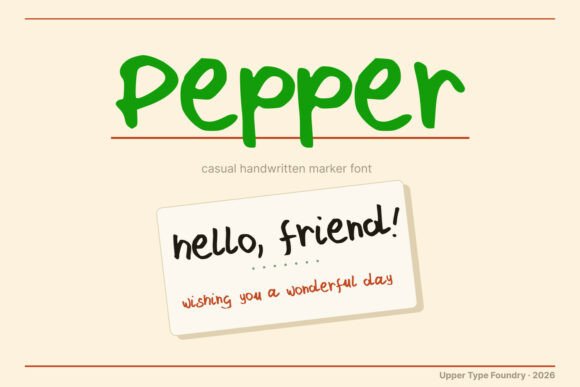
Pepper isn’t just another playful script font—it’s a deliberately relaxed, felt-tip marker typeface built for clarity of purpose. Designed by Upper Type Foundry, Pepper delivers uppercase, lowercase, numerals, and punctuation with Western European language support (FR, DE, ES, IT, PT). Its casual authenticity doesn’t come from randomness; it comes from consistency in texture, rhythm, and weight. That makes Pepper especially valuable when your goal isn’t just visual charm—but strategic alignment between tone, audience, and outcome.
Why “Relaxed” Doesn’t Mean “Undisciplined”
A handwritten aesthetic can signal approachability, warmth, or spontaneity—but only if it’s used with intention. Pepper avoids the pitfalls of overly decorative or inconsistent scripts because its letterforms maintain even spacing, legible contrast, and predictable baseline behavior. That means it scales reliably across sizes and mediums: from a 12pt sticker label to a 72pt poster headline. For creators who manage multiple touchpoints—product packaging, social graphics, classroom handouts, or print-on-demand merchandise—this consistency reduces revision cycles and supports brand coherence without sacrificing personality.
Where Pepper Fits Into Real-World Planning
Consider how you allocate design resources. Every font choice carries implicit assumptions about audience expectations, production constraints, and long-term maintenance. Pepper excels where human-centered communication matters more than formal authority: greeting cards that feel personal, kids’ activity sheets that invite participation, craft kits that emphasize tactile joy, or Cricut projects where cut-line fidelity depends on clean glyph outlines. It’s not suited for legal disclaimers or data dashboards—but that’s not a limitation. It’s a signal: Pepper works best when your goal is connection, not compliance.
- Greeting cards: Pepper softens formality without losing readability—ideal for birthdays, baby announcements, or thank-you notes where emotional resonance matters more than typographic neutrality.
- Packaging for small-batch goods: When your soap label or candle jar competes on shelf presence, Pepper helps convey handmade care while remaining scannable at arm’s length.
- Educational materials: Teachers and curriculum designers use Pepper in worksheets or flashcards to reduce cognitive load—its open counters and friendly shapes support early readers without infantilizing older learners.
- Digital stickers and POD products: Because Pepper includes full Western European diacritics, it supports multilingual audiences without swapping fonts mid-project—a practical win for global Etsy sellers or bilingual educators.
Using Pepper With Purpose—Not Just Preference
Choosing Pepper shouldn’t be a reflexive “I like this style.” It should follow a short but meaningful decision sequence:
- What outcome do I want this piece to drive? (e.g., increase engagement on an Instagram story, improve comprehension in a workshop handout, differentiate a product line in a crowded marketplace)
- Who needs to read or interact with it—and under what conditions? (e.g., children aged 6–9 reading on a tablet, parents scanning a gift tag in low light, non-native speakers interpreting instructions)
- What other elements will share space with Pepper? (e.g., body text in a neutral sans-serif, photography with high contrast, hand-drawn icons that echo its organic rhythm)
This kind of questioning prevents misalignment—like using Pepper for a law firm’s client intake form, where trust hinges on precision and clarity, not whimsy. It also reveals opportunities: pairing Pepper with a sturdy, highly legible companion font (like a well-spaced grotesk) creates hierarchy without contradiction. The result feels intentional—not eclectic.
Risks of Using Pepper Without Context
The biggest risk isn’t technical—it’s strategic drift. When Pepper is applied broadly across all communications (“Let’s make everything feel friendly!”), it dilutes differentiation. A brand that uses Pepper for both safety warnings and birthday invitations sends mixed signals about reliability and tone. Similarly, overusing Pepper in dense paragraphs or low-resolution digital displays sacrifices legibility for aesthetic continuity—undermining the very goals it was meant to support.
Another subtle risk: assuming linguistic coverage equals cultural fluency. While Pepper supports accented characters for French, German, Spanish, Italian, and Portuguese, it doesn’t adapt to regional typographic conventions—like German capitalization rules in headings or Spanish inverted punctuation placement. Those details still require human judgment and proofing. Pepper enables multilingual output; it doesn’t replace editorial rigor.
Practical Integration Tips for Creators and Teams
If you’re evaluating whether Pepper fits your workflow, start small—but think structurally:
- Test at real scale: Render Pepper at the smallest size it’ll appear in final use (e.g., 8pt on a sticker, 14pt on a web banner) and assess legibility against background contrast. Its relaxed stroke width means it benefits from generous spacing and uncluttered surroundings.
- Map usage to function: Define clear internal guidelines—for example, “Pepper is approved for primary headlines, callouts, and hand-lettered accents only; body copy remains in Inter or Lato.” This preserves flexibility while preventing visual fatigue.
- Check export compatibility: Pepper works seamlessly in Adobe Creative Cloud, Affinity apps, Cricut Design Space, and most modern web environments via variable or static OTF/TTF files. But verify rendering in legacy systems if supporting older print vendors or enterprise CMS platforms.
- Pair thoughtfully: Avoid stacking multiple handwritten fonts. Instead, combine Pepper with a neutral, highly legible sans-serif for balance—or a subtle serif for contrast that still honors craft sensibility.
Long-Term Value Beyond Aesthetics
Over time, consistent, thoughtful use of Pepper builds recognition—not as a standalone logo element, but as part of a broader voice system. Customers begin associating its warmth with your responsiveness; students link its clarity to your teaching scaffolding; collaborators recognize its presence as shorthand for “this is meant to be experienced, not just scanned.” That kind of associative strength compounds quietly, especially for small businesses and independent creators without massive marketing budgets.
It also supports operational efficiency. Because Pepper includes comprehensive character sets and stable metrics, teams spend less time troubleshooting missing glyphs, adjusting kerning manually, or rebuilding assets for different languages. That’s not just convenience—it’s capacity redirected toward strategy, iteration, and customer insight.
Final Consideration: Pepper Is a Tool, Not a Strategy
No font—including Pepper—solves unclear positioning, weak messaging, or misaligned goals. Its value emerges only when anchored to deliberate decisions: about audience, context, medium, and outcome. Use it to reinforce warmth where warmth is needed—not to mask ambiguity. Apply it to highlight moments of human connection—not to distract from functional gaps. And always ask: Does this choice make the next step easier for the person engaging with it?
When approached this way, Pepper becomes more than a stylistic detail. It becomes part of a responsible, responsive design practice—one that respects attention, honors language, and supports real-world outcomes without overpromising or oversimplifying.