Homeschool Mom: A Quirky Handwritten Font That Works—When Used Right
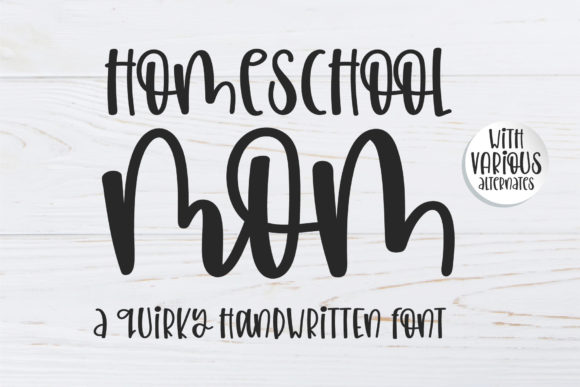
If you’ve ever scrolled through a font marketplace and paused at Homeschool Mom, you’re not alone. Its relaxed, slightly uneven letterforms—like inked notes jotted between school runs and snack prep—feel warm, human, and refreshingly unpolished. But here’s what many miss: Homeschool Mom isn’t just “cute.” It’s a functional tool with specific strengths—and clear limits. Used thoughtfully, it adds charm to invitations, social graphics, or educational printables. Used carelessly, it undermines readability, professionalism, or brand cohesion.
What Homeschool Mom Actually Is (and Isn’t)
Homeschool Mom is a single-style, handwritten display font—not a full family with weights, italics, or alternates. It’s designed for impact at larger sizes: headlines, quotes, logos, or short phrases where personality matters more than dense text flow. It’s not built for body copy, UI labels, or long-form web content. Confusing it with a versatile workhorse font is the first misstep many creators make.
Its appeal lies in authenticity—not perfection. Letters vary subtly in height and slant; some terminals taper, others lift playfully. That’s intentional. But that same looseness means it won’t pair seamlessly with rigid sans-serifs unless you intentionally balance contrast. And while its name evokes warmth and approachability, it doesn’t automatically convey trust, authority, or modernity—so context matters deeply.
Common Missteps—and What They Cost You
Assuming it works everywhere. One freelance educator bought Homeschool Mom for her entire course workbook—headers, instructions, sidebars, even footnotes. The result? Students struggled to scan steps quickly, and printed pages felt visually cluttered. Handwritten fonts lose clarity below ~24pt, especially in paragraph form. The cost wasn’t just time—it was reduced engagement and follow-through.
Skipping pairing tests before finalizing a design. A small bakery owner used Homeschool Mom for their “Freshly Baked Daily” sign—but paired it with a condensed geometric sans. The contrast wasn’t complementary; it felt jarring and unintentionally chaotic. Without testing spacing, x-height alignment, and visual rhythm, even strong fonts can clash.
Overlooking licensing scope. A blogger downloaded a free version labeled “Homeschool Mom,” only to discover later it was a demo with missing characters (no numerals, no punctuation beyond basic periods). When she launched a paid printable bundle, key prices and dates rendered as blank boxes. She had to reformat everything—and lost two days of launch momentum.
Ignoring file format limitations. Some versions of Homeschool Mom come only as .TTF, which lacks OpenType features like ligatures or stylistic sets. If your project relies on alternate glyphs (e.g., a swash capital “Q” or contextual “f-l” connection), you’ll need the .OTF version—or risk flat, lifeless output.
Better Choices: Practical Fixes That Stick
Use it where it shines—and only there. Reserve Homeschool Mom for short, high-impact elements: a workshop title on a flyer, a quote overlay on Instagram, a logo lockup for a parenting podcast, or a playful section divider in a PDF planner. Keep supporting text in a clean, legible companion font—like Montserrat, Lora, or Inter.
Test early, test often—at real size and in real context. Before committing, paste your actual headline into a mockup: a Canva social post, a printed label, or a webpage banner. Zoom out. Step back three feet. Ask: Is the message instantly clear? Does any letter blend or distract? If you hesitate, simplify.
Verify licensing *before* designing—not after. Check whether your use case (e.g., client work, digital downloads, merchandise) is covered. Reputable sellers list usage rights clearly. If it says “Personal Use Only,” don’t use it in a client’s Shopify banner—even if it looks perfect. Better yet: buy the extended license upfront if you freelance regularly. It’s cheaper than redos or takedown requests.
Download the right file—and confirm character coverage. Open the font in Font Book (Mac) or Character Map (Windows) and scroll through numbers, punctuation, and accented characters you’ll actually need. If your business serves bilingual families, check for ü, ñ, ç, or é. If your product includes pricing, verify $, %, and decimals render cleanly.
What to Check Before You Commit
- Does it include lowercase, uppercase, numerals, and essential punctuation? Many handwritten fonts skip symbols or offer them inconsistently.
- Is the spacing tight, even, or intentionally loose? Homeschool Mom leans generous—great for airy layouts, less ideal for tight columns or narrow buttons.
- How does it scale? Try it at 18pt, 36pt, and 72pt. Does legibility hold? Does the charm deepen—or start to feel sloppy?
- What do real users say about rendering on screen vs. print? Some handwritten fonts pixelate on low-res displays or thin out when printed small. Look for reviews mentioning “web use” or “inkjet testing.”
- Is technical support available? Not all font sellers offer help—if you hit a glitch installing or embedding, a responsive creator saves hours.
Remember: Homeschool Mom isn’t about replacing your font toolkit. It’s about adding a voice—distinct, friendly, unhurried. Like choosing the right pen for a handwritten note, its power comes from intention, not ubiquity. Use it where warmth and humanity elevate your message—not where precision or speed must lead. When you match its personality to the right purpose, it doesn’t just look good. It feels right.