Wildlife Adventure: A Handwritten Font That Fits Real Creative Workflows
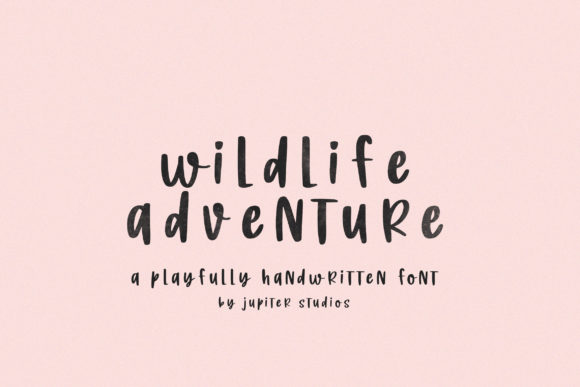
Wildlife Adventure isn’t just another decorative typeface—it’s a practical, expressive tool built for people who design, communicate, and create with intention. As a cool and casual handwritten font, it bridges the gap between personality and professionalism. Whether you’re sketching a concept on paper or finalizing a client presentation, Wildlife Adventure delivers warmth without sacrificing clarity. Its relaxed letterforms—slight variations in stroke weight, natural rhythm, and subtle imperfections—mimic authentic handwriting, making it feel human-centered rather than algorithmically polished.
Where Wildlife Adventure Fits in Your Creative Process
Fonts don’t exist in isolation. They’re part of a chain: idea → draft → refinement → delivery → feedback → iteration. Wildlife Adventure slots in most effectively during the mid-to-late stages of that chain—when tone, audience connection, and visual authenticity matter more than rigid uniformity. It’s rarely the first font you choose for wireframing or data-heavy spreadsheets, but it shines when you’re moving from functional to resonant: turning a generic greeting card into something heartfelt, transforming a dry workshop handout into an inviting learning tool, or giving a brand’s social post a grounded, approachable voice.
For educators building lesson materials, Wildlife Adventure works well in slide headers or printable activity sheets—adding visual warmth without distracting from content. Freelance designers often use it in mood boards or early mockups to signal a playful, organic direction before committing to full branding assets. Small business owners find it especially useful in seasonal promotions (think holiday cards, farmers’ market signage, or handmade product labels), where authenticity builds trust faster than polished corporate fonts.
Using Wildlife Adventure Before, During, and After Key Tasks
Before a project: Test Wildlife Adventure alongside your core brand fonts during style guide development. Does it complement your primary sans-serif or serif? Does it support your brand’s voice—friendly but not childish, creative but not chaotic? Use it in low-stakes internal documents first: team meeting agendas, brainstorming notes, or internal pitch decks. This helps calibrate how it reads at different sizes and in various color combinations—especially important since handwritten fonts can lose legibility in small point sizes or low-contrast settings.
During execution: Integrate Wildlife Adventure selectively—not as body text, but as a strategic accent. Use it for section dividers in digital presentations, quote callouts in blog posts, or headline treatments in Canva templates. In Adobe Illustrator or Figma, pair it with a clean, highly legible sans-serif (like Inter or Open Sans) for contrast and hierarchy. Avoid overusing it across multiple elements on one screen; two or three intentional placements often have more impact than five scattered uses.
After delivery: Review real-world performance. Did recipients respond more warmly to a Wildlife Adventure–styled email subject line? Did customers linger longer on a landing page banner using it? Track engagement metrics where possible—but also pay attention to qualitative cues: Are collaborators commenting on how “inviting” or “thoughtful” the design feels? That’s often the best indicator that the font is doing its job—not drawing attention to itself, but reinforcing your message’s emotional subtext.
Compatibility and Practical Integration
Wildlife Adventure is a standard OTF/TTF font file, so it installs and behaves like any system font—no special plugins or web hosting requirements. It works natively in Microsoft Office, Google Workspace (via upload), Adobe Creative Cloud apps, Figma, Canva, and most modern design tools. For web use, convert it responsibly using @font-face with fallbacks, and always test rendering across browsers and devices. On mobile, ensure letter spacing remains open enough to prevent crowding—especially in uppercase applications.
Its casual nature means it pairs best with structure elsewhere in the layout. If your background is textured or your imagery is rich, keep other typographic elements minimal. Conversely, if your visuals are stark or minimalist, Wildlife Adventure becomes the primary source of character—so give it breathing room. Avoid pairing it with other handwritten fonts unless there’s clear visual distinction (e.g., one script for headings, another for captions with markedly different x-heights or slant angles).
Workflow Examples Across Roles
- Bloggers & Content Creators: Use Wildlife Adventure for pull quotes in long-form articles or newsletter banners. Export as SVG for crisp scaling, and always include alt text describing the visual tone (“handwritten-style headline emphasizing warmth and approachability”).
- Educators: Embed it in printable PDF worksheets for vocabulary exercises or story starters. Since students often print materials, test how it renders on common inkjet printers—some handwritten fonts show unintended gaps or thin strokes when printed at 72 dpi.
- Small Business Owners: Apply it consistently to one recurring asset—like weekly Instagram Story highlights or receipt footers—to build subtle recognition without overwhelming the brand system.
- Freelancers: Include a lightweight usage guide with deliverables: “Wildlife Adventure used for headlines only; body copy remains in Inter Regular.” This sets expectations and prevents clients from misapplying it in ways that compromise readability.
Long-Term Usability Considerations
Like any expressive font, Wildlife Adventure benefits from disciplined application. Over time, users notice patterns: it performs best above 24pt in print, 32px on screen, and loses nuance below 16pt. Its lowercase ‘a’, ‘g’, and ‘y’ have distinctive shapes—leverage those for custom bullet points or icons in presentations. Also, check licensing early: while many versions allow commercial use, verify whether web embedding or app integration is covered—especially if you’re building a SaaS dashboard or digital course platform.
Consistency matters more than variety. Rather than rotating through multiple handwritten fonts per project, commit to Wildlife Adventure as your go-to for specific contexts—say, all handwritten-style elements across a six-month campaign. That builds familiarity for your audience and reduces decision fatigue for your team. Revisit usage every quarter: does it still align with your evolving brand voice? Has audience feedback suggested it reads as too informal in certain contexts? Adjust—not abandon—based on real input.
Getting Started Without Overcomplicating It
You don’t need a font management system or advanced typography training to use Wildlife Adventure well. Start with one repeatable use case: a monthly team appreciation note, a signature section in your portfolio website, or the title treatment for your next workshop handout. Install the font, open your usual tool, and try it at three sizes—then step away for 10 minutes and come back. Does it still feel right? Does it support the message—or compete with it?
Then expand deliberately. Add it to your template library with clear naming (“Wildlife Adventure – Headline Only”) and documented constraints (“Not for body text or data tables”). Share that guidance with collaborators. Over time, it becomes less about choosing a font and more about reinforcing a consistent, human-centered communication habit—one that supports clarity, builds connection, and stays grounded in real work.