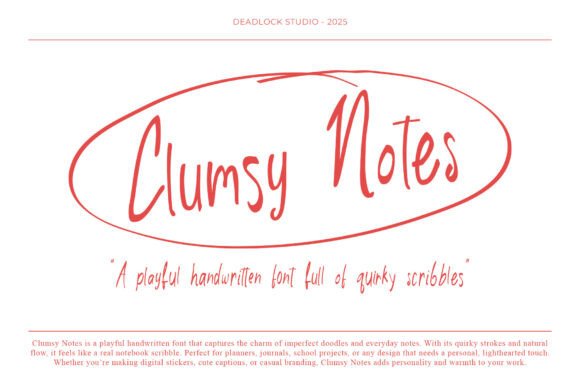
Clumsy Notes: The Handwritten Font That Feels Like a Real Notebook Scribble
Ever scrolled through a design mockup and paused—not because it’s flashy, but because it feels human? That warm, slightly uneven, effortlessly charming vibe? Chances are, Clumsy Notes was part of the magic. This isn’t just another handwritten font. It’s a deliberate celebration of imperfection—crafted to mirror the joyful chaos of real-life note-taking: coffee rings, quick underlines, looping letters that don’t quite line up, and strokes that breathe like they were made with a felt-tip pen on lined paper.
Why “Clumsy” Is Actually Brilliant Design
The name Clumsy Notes might raise eyebrows at first. After all, designers often chase polish, precision, and consistency. But here’s the truth: in today’s digital landscape—where interfaces are sleek, fonts are ultra-legible, and content scrolls past in under two seconds—clumsiness becomes a powerful differentiator. Clumsy Notes leans into natural variation: each lowercase “a” or “g” has subtle alternatives; ascenders wobble just enough; terminals taper like ink drying mid-stroke. These aren’t bugs—they’re features designed to mimic how real handwriting behaves.
Unlike many script fonts that feel overly formal or performative, Clumsy Notes avoids forced elegance. There’s no dramatic flourishes or exaggerated swashes. Instead, it offers gentle irregularity—the kind you’d see in a student’s margin doodle, a teacher’s feedback scrawled on an essay, or a planner user jotting down “buy milk ☕” between yoga and lunch.
Where Clumsy Notes Fits Best (and Where It Doesn’t)
Clumsy Notes shines brightest in contexts where authenticity and approachability matter more than rigid readability. Think of it as your friendly, slightly messy collaborator—not your corporate legal document signer.
- Planners & Digital Journals: Whether you're designing printable weekly spreads or building a Notion template with custom sticker sets, Clumsy Notes adds instant warmth. Use it for headers like “Today’s Wins” or “Brain Dump Zone”—not for fine-print instructions.
- School Projects & Student Creativity: Teachers using Canva or Google Slides to make classroom posters, flashcards, or assignment handouts find Clumsy Notes instantly relatable for kids and teens. It signals “this is for you—not just for grading.”
- Casual Branding & Small-Business Touchpoints: A local bakery’s Instagram story announcing “Fresh croissants 🥐 — grab one before noon!”? Perfect. A boutique stationery shop naming its new notebook line “Clumsy Pages”? Even better. It supports brand voice without shouting.
- Digital Stickers & Social Captions: On platforms like Pinterest, TikTok, or even WhatsApp status updates, Clumsy Notes gives text-based stickers personality. Try pairing it with soft pastel backgrounds and simple line art—it’s visual comfort food.
That said, avoid Clumsy Notes for body copy, long paragraphs, accessibility-critical interfaces (like medical forms or emergency alerts), or anything requiring high scanability at small sizes. Its charm lives in short bursts—not sustained reading.
How It Works With Modern Tools—and What to Watch For
Clumsy Notes is typically offered as a standard OTF or TTF file, meaning it installs easily on Mac, Windows, and most design apps—including Figma, Adobe Creative Cloud, Canva (via upload), and even some note-taking tools like Obsidian (with CSS snippets). No special plugins needed.
But here’s what users often overlook: pairing matters. Because Clumsy Notes is so expressive, it pairs best with clean, neutral companions. Try it with Inter, Manrope, or even Helvetica Neue for contrast. Never pair it with another decorative or script font—that’s visual noise, not harmony.
Also keep kerning in mind. While Clumsy Notes includes basic OpenType features (like contextual alternates), automatic spacing won’t always feel right—especially around punctuation or tight letter combinations like “r” + “n”. A quick manual nudge in Illustrator or Figma can elevate your headline from “cute” to “intentionally crafted.”
Real-Life Use Cases That Prove Its Value
A homeschool parent built a monthly habit tracker for her 8-year-old using Clumsy Notes for all activity labels (“Read 20 min”, “Help set table”, “Draw something silly”). The child didn’t just use it—she *claimed* it, adding her own doodles beside each box. The font lowered the barrier between “assignment” and “play.”
A mental health coach redesigned her client journal PDFs with Clumsy Notes headings and bullet points. Feedback? “It feels less clinical. Like I’m talking to myself kindly—not filling out paperwork.”
An indie game developer used Clumsy Notes for in-game UI elements in a cozy life-sim title—think quest logs, inventory notes, and NPC dialogue boxes. Players reported feeling “more immersed in the world’s handmade aesthetic,” even though everything was pixel-perfect code.
What Makes Clumsy Notes Stand Out Among Handwritten Fonts?
There are hundreds of handwritten fonts online. So why does Clumsy Notes keep showing up in thoughtful, high-performing designs? Three reasons:
- Natural rhythm over repetition: Many script fonts rely on ligatures or forced connections to look “handwritten.” Clumsy Notes uses varied stroke weight, slight angle shifts, and intentional looseness—so it feels less like a looped animation and more like someone actually writing in real time.
- Warmth without whimsy overload: It avoids cartoonish exaggeration (no giant bouncy “b”s or glittery “o”s). That restraint makes it versatile across age groups and tone—from playful to gently reflective.
- Low friction, high reward: You don’t need calligraphy skills or font-hacking know-how to get great results. Install it. Type. Adjust size and color. Done. The personality comes baked-in—not bolted-on.
Choosing Clumsy Notes: Practical Considerations
If you’re evaluating whether Clumsy Notes fits your project, ask yourself:
- Is the goal to evoke sincerity, informality, or creative freedom?
- Will this text appear in short, scannable bursts—or long-form reading?
- Does your audience respond well to tactile, analog-inspired visuals?
- Do you have control over typography (e.g., not locked into a branded web template with fixed fonts)?
If most answers are “yes,” Clumsy Notes is likely a strong contender. Bonus tip: download the free trial version first. Test it in your actual workflow—type out a few sample captions, paste it into your preferred app, and sit with it for a day. Does it still feel right when you’re not looking at it fresh?
Final Thought: Personality Has a Typeface
In a world saturated with algorithmically optimized content and AI-generated visuals, choosing a font like Clumsy Notes is quietly radical. It says: I value humanity over uniformity. I choose warmth over width. I trust that real connection starts with something as simple as a line that doesn’t quite follow the ruler.
It won’t solve every design challenge—but for planners, educators, small creators, and anyone building spaces where people feel seen and softly guided? Clumsy Notes isn’t just a font. It’s a tone of voice, a gesture, a quiet invitation to be imperfectly, joyfully human.