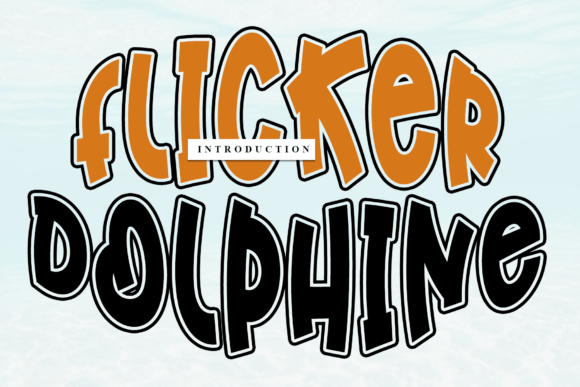
Flicker Dolphine: A Handwritten Font That Elevates Authenticity—Without the Pitfalls
There’s a quiet power in handwriting—the slight variation in stroke weight, the gentle tilt of an “a”, the organic flow from one letter to the next. Flicker Dolphine captures that warmth with remarkable fidelity. It’s not just another script font; it’s a carefully crafted, timeless handwritten typeface where every glyph feels intentional, expressive, and alive. Designers reach for it when they need personality without pretension—whether crafting a boutique logo, a heartfelt Instagram quote, or packaging that invites touch and trust.
Why People Reach for Flicker Dolphine (and Why Some Regret It Later)
Its appeal is genuine: elegant yet approachable, legible at medium sizes, and versatile across print and digital. But enthusiasm alone doesn’t guarantee great results. Many users—especially beginners or time-pressed creators—assume that because Flicker Dolphine looks friendly and fluid, it will “just work” anywhere. That assumption leads to three recurring oversights.
Mistake #1: Using It for Body Text or Small UI Labels
Flicker Dolphine was designed for impact—not endurance. Its delicate joins, subtle flourishes, and variable baseline alignment make it hard to read below 24px in digital interfaces or in long paragraphs. One freelance educator tried using it for course handouts, only to receive feedback like “I had to reread every sentence.” The result wasn’t charm—it was cognitive load.
Better approach: Reserve Flicker Dolphine for headlines, short quotes, logos, or hero-section text. Pair it with a clean, highly legible sans-serif (like Inter, Lato, or Open Sans) for supporting copy. That contrast reinforces hierarchy—and readability.
Mistake #2: Assuming All “Flicker Dolphine” Downloads Are Equal
You’ll find dozens of sites offering “free Flicker Dolphine”—but many are outdated, incomplete, or even modified versions missing critical OpenType features (like contextual alternates or ligatures). Worse, some bundles include malware-laden installers or redirect scripts. A small business owner once downloaded a “free version” from an unofficial forum, only to discover their logo files wouldn’t export correctly from Illustrator due to missing glyphs and corrupted kerning pairs.
Better approach: Source Flicker Dolphine only from trusted platforms—its official foundry site, reputable marketplaces like Creative Market or MyFonts, or verified design subscription services. Check the download includes full character sets (Latin extended, punctuation, numerals), OpenType features, and clear licensing terms. If the page lacks a preview of the full glyph set or usage guidelines, pause and look elsewhere.
Mistake #3: Ignoring Licensing Scope—Especially for Client Work
Licensing confusion is the most common source of last-minute stress. A freelancer used Flicker Dolphine in a restaurant’s branding package—then realized their standard desktop license didn’t cover the client’s website, email campaigns, or printed menus. Suddenly, a $35 purchase needed upgrading to a multi-user or extended license, delaying delivery and straining trust.
Better approach: Before downloading or purchasing, ask three questions:
- Does this license cover *all* intended uses? (e.g., web embedding, app UI, merchandise, video titles)
- Is redistribution permitted? (e.g., if you’re delivering brand assets to a client, do they need their own license?)
- What happens if your project scales? (Some licenses cap impressions or revenue tiers.)
What to Test Before You Commit
Don’t rely on a single headline preview. Try these quick checks to avoid surprises:
- Test real phrases—not just “The Quick Brown Fox.” Type your actual tagline or product name. Does the “&” sit awkwardly? Does the lowercase “g” clash with your brand color? Flicker Dolphine has stylistic alternates—some versions include multiple “a”, “g”, or “y” options. See if your software lets you access them via the Glyphs panel (in Illustrator or Affinity) or OpenType menu.
- Zoom out to 50%. Does spacing hold up? Does tracking feel even—or does “WOW” look crammed while “iii” feels lost? Adjusting letter-spacing manually is fine, but if you’re adding >50 units of tracking just to breathe, reconsider its fit for that context.
- Print a sample on your target paper stock. What looks lush on screen can flatten or bleed on uncoated matte paper. Run a test print of your logo or business card at actual size. Notice how ink spread affects fine strokes—especially in lowercase “e” or “c” terminals.
When Flicker Dolphine Shines—and When to Step Back
It excels in contexts where humanity matters more than uniformity: wedding invitations, artisanal food labels, personal blog headers, teacher newsletters, handmade product tags, or nonprofit campaign visuals. In those spaces, its irregularities aren’t flaws—they’re signals of care.
But it’s not ideal for data dashboards, technical documentation, multilingual interfaces (it lacks extensive non-Latin support), or situations demanding strict brand consistency across dozens of global markets. If your brand voice leans toward precision, authority, or minimalism, consider pairing Flicker Dolphine selectively—say, only in your founder’s handwritten signature on an “About Us” page—rather than as a system font.
A Final Note on Intentionality
Flicker Dolphine isn’t a shortcut to “looking creative.” It’s a tool that rewards thoughtful application. The most effective uses share one trait: they serve the message—not the trend. A coffee shop’s chalkboard menu gains warmth from Flicker Dolphine’s rhythm; a fintech dashboard loses clarity trying to force it in.
So before you drop it into your next layout, ask: Does this choice make communication easier—or more decorative? If the answer leans toward decoration alone, revisit your goal. Great typography doesn’t shout—it listens, then responds with clarity and character. And when used well, Flicker Dolphine does exactly that.