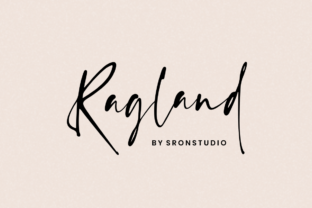
Ragland: A Natural Handwritten Font for Thoughtful Execution
Ragland isn’t just another script font—it’s a tool shaped by rhythm, restraint, and quiet intention. With its organic stroke variation, subtle ink bleed, and relaxed letter spacing, Ragland mimics the warmth of pen-on-paper without sacrificing legibility or structure. It doesn’t shout. It invites pause, reflection, and clarity—qualities that matter most when you’re designing a landing page, drafting a course outline, sketching a brand identity, or preparing a client pitch.
Where Ragland Fits in Real Workflows
Fonts aren’t used in isolation. They’re selected as part of a sequence: research → intent → structure → expression → refinement. Ragland enters most naturally at the expression stage—when ideas have taken shape but haven’t yet hardened into final form. That makes it especially useful for projects where tone, authenticity, and human connection are priorities: educator handouts, small business newsletters, creative briefs, workshop workbooks, or personal branding assets like portfolio covers and thank-you notes.
It’s rarely the first choice for dense body copy or UI interfaces—but that’s intentional. Its strength lies in moments where visual breathing room supports cognitive processing. Think of it as the handwritten margin note beside a well-structured spreadsheet, or the signature line beneath a carefully worded contract clause. It signals care—not perfection.
Before the Project: Setting Tone and Intent
Before opening Figma or typing a headline, many creators use mood boards, style frames, or even physical sketchbooks to align on voice and values. Ragland works well here—not as final output, but as a tonal anchor. Drop it into a slide deck header during stakeholder alignment, or use it in early wireframes to signal “this is approachable, human-centered, and grounded.” Because it avoids the sterility of over-polished scripts, it helps teams avoid misaligned assumptions about audience expectations.
For educators building lesson plans or freelancers drafting proposals, applying Ragland to early-stage documents subtly reinforces a commitment to accessibility and warmth—without needing to state it outright. It becomes part of the pre-work calibration: not just *what* you’ll deliver, but *how* it should feel to receive it.
During the Project: Guiding Attention and Reducing Cognitive Load
Once execution begins, Ragland functions best in controlled, high-impact roles. Use it for:
- Headlines and subheads that introduce new sections in digital or print learning materials;
- Callout boxes highlighting key takeaways in long-form blog posts or resource guides;
- Signature lines and closing statements in branded email templates or PDF reports;
- Illustrative labels in infographics or process diagrams where personality matters more than precision.
Avoid stretching it across full paragraphs or using it at very small sizes (<14px). Its organic nature means it thrives with space—both typographic and contextual. Pair it with a clean, neutral sans-serif (like Inter, Lato, or Open Sans) for contrast and balance. This pairing isn’t decorative—it creates functional hierarchy: Ragland draws the eye and sets emotional context; the sans-serif delivers information efficiently.
After the Project: Reinforcing Consistency and Memory
Post-launch, fonts contribute to recognition and recall. Ragland’s distinct character helps reinforce brand or personal identity—not through repetition alone, but through consistency of application. If you use it only for handwritten-style accents (not logos or navigation), people begin associating that texture with your voice: thoughtful, unhurried, detail-aware.
This matters for small business owners sending seasonal offers, bloggers curating downloadable resources, or educators sharing reflection prompts. Each time Ragland appears in the same role—say, as the font for all “Key Insight” callouts—it builds subtle familiarity. That’s not branding via volume; it’s branding via pattern.
Practical Integration Tips
Start small. Pick one recurring use case—like worksheet headers or email subject lines—and commit to using Ragland there for 30 days. Observe how it affects readability, engagement, or even your own sense of intention when preparing those assets.
Test compatibility early. Ragland includes OpenType features like stylistic alternates and ligatures. Enable them in design tools (Figma, Illustrator, Affinity) to unlock its full expressiveness—but verify rendering in browsers and email clients if exporting web assets. For broad compatibility, stick to the standard character set and avoid heavy stylistic variants in production HTML/CSS.
Respect contrast and scale. Ragland gains impact when surrounded by whitespace and paired with ample line height. In CSS, use line-height: 1.5 or higher for headings set in Ragland. In print layouts, allow at least 20% more vertical space than you would with a geometric sans-serif.
Consider licensing scope. Ragland is available under desktop, web, and app licenses. If you’re embedding it in a SaaS dashboard or client-facing web app, confirm your license covers dynamic text rendering—not just static exports. Misalignment here can cause fallbacks or compliance issues down the line.
How Ragland Interacts With Other Tools and Decisions
Ragland doesn’t replace strategy—it supports it. When paired with Notion templates, it adds tactile warmth to otherwise functional databases. When layered into Canva presentations, it counters the platform’s default polish with grounded authenticity. In Adobe Express or Figma auto-layouts, it reminds designers to leave room for imperfection—because real workflows aren’t rigidly templated.
It also interacts meaningfully with decisions about voice and audience. If your content targets professionals seeking clarity—not whimsy—Ragland’s casual intelligence fits better than a flamboyant brush script. If you serve creatives who value craft, its attention to stroke weight and exit strokes signals shared values. It’s not neutral—but its neutrality isn’t the point. Its purpose is resonance.
Long-Term Use: Sustainability Over Novelty
Fonts wear out when overused or misapplied—not when they’re familiar. Ragland sustains relevance because it resists trend-chasing. It won’t look dated next year because it wasn’t designed to look “now.” Its organic quality comes from observation—not algorithmic novelty.
To keep it fresh over time, rotate its usage context: this quarter, use it for podcast show notes; next, apply it to workshop handouts; later, integrate it into printed thank-you cards for collaborators. The variation keeps it intentional—not habitual.
Also consider how it supports your energy. If selecting fonts feels like administrative overhead, Ragland reduces friction: one reliable option for expressive moments, no need to cycle through dozens of alternatives. That’s efficiency rooted in trust—not speed alone.
Final Thought: Let Ragland Serve the Work, Not the Other Way Around
The most effective tools don’t demand attention—they enable focus. Ragland works because it stays quietly present: supporting structure without dominating it, adding warmth without distracting from substance, reinforcing voice without overriding message. It’s not about making things “look handwritten.” It’s about honoring the human rhythm behind every plan, decision, and delivery.
So ask yourself: where in your current workflow does a moment of calm intention need emphasis? Where does clarity benefit from softness? Where does your audience need to feel seen—not sold to? That’s where Ragland earns its place—not as decoration, but as deliberate support.