Lineme: The Friendly Handwritten Font That Makes Your Designs Feel Warm, Clear, and Effortlessly Personal
If you’ve ever spent too long searching for a handwritten font that’s both charming and highly legible—something that looks authentically human but still works flawlessly in planners, classroom printables, or digital thumbnails—you’re not alone. Many designers, teachers, small business owners, and hobbyists hit the same wall: fonts that are either too stiff to feel personal or too scribbly to read at a glance. That’s where Lineme steps in—not as another decorative novelty, but as a practical, everyday handwriting font built for real use.
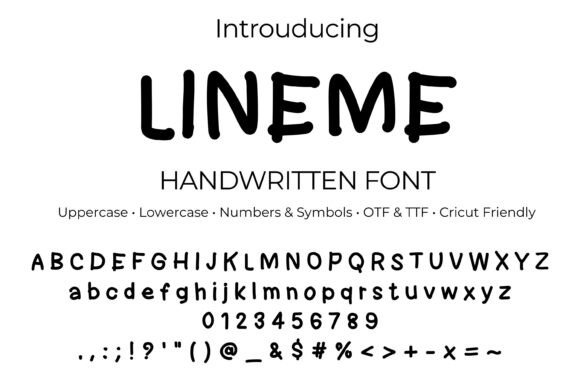
Lineme is a friendly, rounded, monoline handwritten typeface designed with smooth marker-like strokes. It avoids sharp angles and inconsistent weight shifts, giving it a consistent, approachable rhythm—like your favorite pen gliding across paper. Its rounded edges soften its appearance without sacrificing clarity, and its open letterforms ensure readability even at smaller sizes. Whether you're labeling student folders, designing printable habit trackers, or crafting minimalist logos for a boutique brand, Lineme delivers warmth *and* function in one package.
Why Lineme Solves Real Design Challenges
Many users struggle with fonts that look great in mockups but fall short in practice. For example:
- Teachers need fonts that kids can read quickly on handouts—but also feel inviting enough to reduce visual overwhelm.
- Planner creators want handwritten style without sacrificing alignment, spacing, or compatibility across apps like GoodNotes or Notability.
- Small business owners building Instagram thumbnails or product labels need something distinctive yet professional—no “clipart” energy.
- Crafters using Cricut or Silhouette require clean outlines and consistent stroke width so cut lines stay precise and stickers peel cleanly.
Lineme was made with these needs in mind. Its even stroke weight, generous x-height, and balanced letter spacing mean it performs well across contexts—from tiny bullet journal headers to large-scale classroom posters. Unlike many script fonts, it doesn’t rely on ligatures or contextual alternates, so what you type is exactly what you get—no surprises, no troubleshooting.
Where Lineme Shines (and How to Use It Well)
Lineme isn’t just versatile—it’s purpose-built for outcomes. Here’s how different users get the most from it:
For Educators & Homeschoolers
Use Lineme for student name tags, behavior charts, vocabulary cards, and editable worksheet headers. Its gentle curves reduce cognitive load for emerging readers, while its clean structure keeps instructions scannable. Pair it with a simple sans-serif like Montserrat for body text—this combination supports accessibility without losing personality.
For Planners & Journalers
In bullet journals or printable PDF planners, Lineme adds instant warmth to weekly headers, habit trackers, and reflection prompts. Try tracking line height between 5–15 pt for airy, breathable note layouts—or go bolder for section dividers. Because it includes full punctuation and numerals, you can type dates, checkmarks, and symbols directly—no workarounds needed.
For Sticker & Label Designers
When designing physical stickers (especially for Cricut Design Space or Silhouette Studio), Lineme’s uniform stroke makes cut lines predictable. Pro tip: add a subtle white outline around your text in design software—this creates a clean separation between ink and background, helping die-cut edges pop. Since Lineme includes uppercase, lowercase, numbers, and common symbols, you can build full phrases (e.g., “Snack Time ✅”, “Library Pass – 3rd Grade”) without switching fonts.
For Branding & Social Media
Minimalist logos, podcast cover art, or YouTube thumbnails benefit from Lineme’s quiet confidence. It conveys approachability without looking childish—ideal for wellness coaches, indie stationery brands, or tutoring services. Used sparingly (e.g., just a logo wordmark or channel name), it builds recognition through consistency and tone.
Simple Setup, Broad Compatibility
Getting Lineme up and running takes under a minute—and works the same way across platforms:
- Download and unzip the folder.
- Double-click the included .otf or .ttf file.
- Select “Install” (Windows) or “Install Font” (Mac).
- Restart your design app—whether it’s Adobe Illustrator, Affinity Designer, Microsoft Word, Procreate (via text tool), or Cricut Design Space.
No plugins. No subscriptions. No SVG conversions. Lineme is a true system font—meaning it behaves like any other installed typeface. You type, it responds. You scale, it stays crisp. You export, it renders cleanly.
Smart Pairings & Practical Tips
While Lineme stands strongly on its own, thoughtful pairing elevates its impact:
- For body copy: Montserrat or Lato offer clean contrast—neutral, modern, and highly readable.
- For emphasis: Use Lineme at slightly larger size or with light letter-spacing (tracking +10–20) to create breathing room.
- For contrast in layered designs: Try a thin sans-serif behind Lineme text to anchor meaning (e.g., “Monday • 9 AM” in Montserrat, followed by “Yoga Class” in Lineme).
- Avoid overcomplicating: Since Lineme is monoline and friendly by nature, skip heavy shadows, gradients, or multiple outlines—they dilute its sincerity.
A Note on What Lineme Is (and Isn’t)
Lineme is a fully functional OpenType and TrueType font—not an SVG cut file, not a Photoshop brush, and not a webfont subscription. That means you own it outright, install it once, and use it anywhere system fonts are supported. It includes the complete character set: A–Z, a–z, 0–9, standard punctuation, and common symbols. There’s no hidden cost, no usage limit, and no need to credit the designer for personal or commercial projects (always confirm the license included with your purchase).
If you’ve tried other handwritten fonts only to find them glitchy in Procreate text boxes, misaligned in Word tables, or unreadable on printed flashcards—Lineme is the grounded, reliable alternative you’ve been looking for. It doesn’t shout. It doesn’t distract. It simply helps your words land with warmth, clarity, and quiet confidence.