Rettabelle
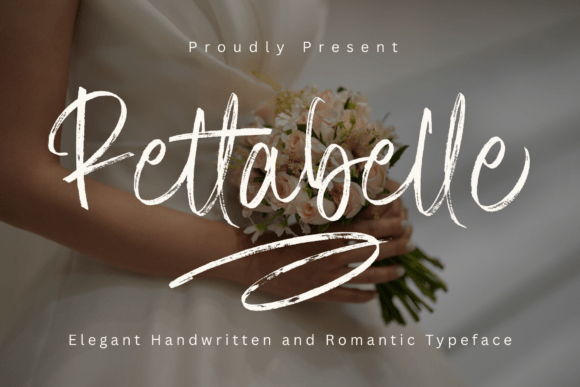
Rettabelle isn’t just another script font—it’s a deliberate design choice for creators who prioritize authenticity without sacrificing polish. Developed to mirror the warmth and rhythm of natural brush handwriting, Rettabelle bridges the gap between handmade charm and digital precision. Its fluid strokes, carefully balanced contrast, and thoughtfully crafted ligatures aren’t decorative afterthoughts—they’re functional elements that support readability, hierarchy, and emotional resonance in real-world applications.
For professionals managing visual identity across touchpoints—whether launching a boutique brand, designing wedding stationery, or building a cohesive social media presence—Rettabelle serves as both a starting point and a finishing touch. It doesn’t replace strategy; it amplifies intention. When you select Rettabelle early in a project, you’re not choosing a typeface—you’re committing to a tone, a pace, and a level of human attention that carries through every decision that follows.
Where Rettabelle Fits Into Your Creative Workflow
Rettabelle integrates most effectively when treated as a foundational asset—not an add-on. That means considering it during the discovery or mood-board phase, not after layout is locked. For example, a small business owner developing a new skincare line might begin by pairing Rettabelle with soft neutrals and matte textures to test how voice and visuals align. A wedding planner sketching invitation concepts will find Rettabelle’s romantic cadence naturally supports storytelling—names flow together, dates feel intentional, and RSVP instructions retain grace without sacrificing clarity.
Its strength lies in consistency across formats. Because Rettabelle includes OpenType features like contextual alternates and discretionary ligatures, it adapts intelligently: “Th” connects smoothly, “ff” and “fi” resolve cleanly, and repeated letterforms avoid monotony. This matters when scaling from a 16px Instagram caption to a 36pt quote graphic—no manual tweaking required, just reliable behavior.
Practical Integration Across Tools and Platforms
Rettabelle works natively in Adobe Creative Cloud (Illustrator, Photoshop, InDesign), Figma, and Affinity apps. Installation is standard—download the .OTF files, install via system font manager, and it appears in your font menu. No plugins or converters needed. For web use, it’s optimized for self-hosting via @font-face, supporting modern browsers and variable font-ready environments (though Rettabelle is currently offered as a static weight family: Regular and Bold).
If you're embedding Rettabelle into a WordPress site or Shopify store, upload the files to your theme assets and declare them in CSS with appropriate fallbacks (e.g., serif). Avoid third-party font hosts unless necessary—self-hosting ensures loading speed, privacy compliance, and full control over licensing terms. Always verify your license permits web use before deployment.
In collaborative environments—like a marketing team using Figma—share the font file alongside a brief usage guide. Include notes on where ligatures are active (they trigger automatically in apps that support OpenType features) and which characters benefit most from manual substitution (e.g., “&” or “ffl”). This prevents version drift and keeps outputs aligned across designers, copywriters, and developers.
Using Rettabelle Before, During, and After Execution
Before execution: Use Rettabelle to prototype tone. Draft a few headline variations for a blog post or product page using only Rettabelle + one neutral sans-serif (like Inter or Lato). Does the combination invite pause? Does it reflect the audience’s expectations? If you’re preparing client presentations, embed Rettabelle into slide templates early—this surfaces alignment issues before final art direction begins.
During execution: Leverage its built-in alternates deliberately. In branding work, assign Rettabelle to primary logotype elements and reserve its lighter weights for subheads or captions. Avoid overusing swashes—reserve them for initials or single-word emphasis (e.g., “Love” in a wedding suite, “You” in a wellness campaign). Overuse dilutes impact; restraint reinforces memorability.
After execution: Audit consistency. Export PDFs or screenshots of key assets—invitations, email headers, Instagram Stories—and review them side-by-side. Does spacing hold up at different sizes? Do ligatures render correctly on mobile? Spot-check on iOS and Android devices if social content is involved. Small inconsistencies compound over time; catching them post-launch builds long-term reliability.
Compatibility and Real-World Constraints
Rettabelle performs best at medium-to-large sizes (18px and up for body, 32px+ for display). It’s not designed for dense UI text or data tables—its expressive nature trades compactness for character. That’s intentional. Knowing this boundary helps avoid misapplication: use it for emotional emphasis, not functional labeling.
Color matters. Rettabelle gains depth with subtle gradients or rich dark tones (charcoal, deep plum, forest green), but loses definition against busy backgrounds or low-contrast combinations. Always test on intended substrates—especially for print. If ordering letterpress or foil-stamped invitations, request a physical proof. Ink spread and paper texture affect how fine strokes translate.
Language support covers Latin-based scripts (English, French, Spanish, German, Portuguese, Italian, Dutch), including diacritics and currency symbols. It does not support Cyrillic, Arabic, or East Asian languages—plan accordingly if multilingual rollout is part of your scope.
Long-Term Use and Quality Control
Build a Rettabelle style guide—not a full document, but a living reference. Note approved pairings (e.g., “Rettabelle Bold + Montserrat Light”), minimum sizes per medium, and banned uses (e.g., all-caps headlines, tight tracking below -25). Store it in your team’s shared drive or Notion workspace. Revisit it quarterly. Fonts evolve in perception as trends shift; your guide ensures Rettabelle stays purposeful, not nostalgic.
When updating assets—say, refreshing a logo lockup or redesigning a newsletter template—ask: does Rettabelle still serve the current brand narrative? If voice has matured toward minimalism or authority, it may be time to re-evaluate. That’s not failure; it’s disciplined evolution. The same applies to personal projects: if your freelance portfolio shifts from lifestyle branding to corporate consulting, Rettabelle remains valuable—but likely in narrower roles (e.g., signature accents, not full headings).
Finally, track usage metrics where possible. In email campaigns, compare open rates and click-throughs for subject lines set in Rettabelle versus your standard sans-serif. On landing pages, A/B test hero section typography. Data won’t dictate aesthetic choice—but it reveals whether your intended emotional cue lands with your audience.
Getting Started Without Overcomplication
You don’t need a full brand audit to begin. Start small: pick one recurring asset—your email signature, Canva story template, or Etsy shop banner—and apply Rettabelle there for two weeks. Observe how it changes perception. Does it feel more personal? Does it slow down scanning—or focus attention where you want it?
Then expand intentionally. Add it to one more touchpoint only after confirming it improves clarity or connection. This iterative approach builds confidence, avoids burnout, and surfaces genuine fit—not just visual novelty.
Rettabelle earns its place not by being everywhere, but by being unmistakably right—wherever it appears. It’s a tool for people who understand that typography isn’t decoration. It’s pacing. It’s permission to breathe. It’s the quiet assurance that what’s being said is worth saying beautifully.