Lipstar Lullaby
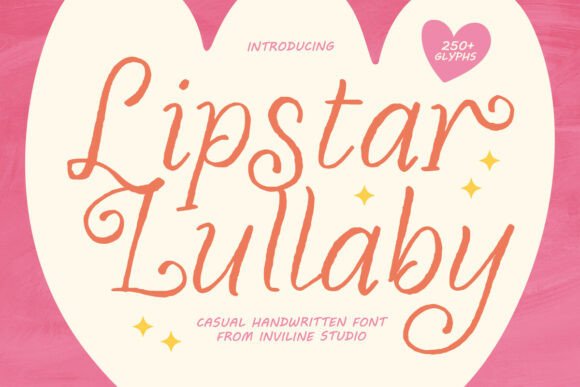
If you’ve ever spent minutes—or hours—scrolling through font marketplaces only to land on something that looks charming in the preview but falls flat in real use, you’re not alone. Lipstar Lullaby, a handwritten font crafted by Inviline Studio, stands out not just for its warmth and playfulness, but for how thoughtfully it bridges intention and execution. It’s not merely “cute” or “trendy”—it’s engineered to feel human, legible, and versatile across real-world contexts: from a toddler’s onesie label to a small-batch candle’s packaging, or even an Instagram quote that stops scrollers mid-feed.
Why Designers and Small Businesses Reach for Lipstar Lullaby
Unlike many handwritten fonts that sacrifice clarity for flair, Lipstar Lullaby balances expressiveness with function. Its sleek, rounded strokes maintain readability at small sizes—a common pitfall when choosing overly decorative scripts. That’s why educators use it for classroom posters without losing students’ attention, and why indie skincare brands choose it over flashier alternatives: it conveys care without shouting.
But here’s where things often go sideways: people assume “handwritten” means “universal.” They download Lipstar Lullaby, drop it into a Canva template, and wonder why the text feels disjointed or inconsistent. The truth? This font shines when its OpenType features are actively used—not ignored. Its 250-glyph set includes playful alternates and ligatures designed to mimic natural handwriting variation (think: how your own “a” or “t” might shift slightly depending on context). Without enabling those features in design software like Illustrator or Affinity Designer, you’ll get only the default characters—missing half the charm and authenticity.
A Common Oversight: Assuming Web Use Is Plug-and-Play
Many creators assume that because Lipstar Lullaby offers WOFF and WOFF2 webfont versions, embedding it on a website is as simple as uploading a file. Not quite. Without proper CSS declarations—including @font-face rules that define weight, style, and fallback behavior—browsers may substitute system fonts or render text inconsistently across devices. Worse, skipping font-display strategies (like font-display: swap) can delay visible text on slower connections, hurting both UX and SEO.
Real example: A boutique bakery added Lipstar Lullaby to their menu page but didn’t declare fallbacks. On older Android devices, visitors saw generic sans-serif text instead of the cozy, hand-lettered headings—undermining the brand’s artisanal voice before the first bite was even imagined.
Multilingual Use Isn’t Automatic—Check What You Actually Need
Lipstar Lullaby supports comprehensive multilingual accessibility—but only if your project’s language requirements align with its included character set. It covers Latin-based languages thoroughly (English, Spanish, French, German, Swedish, Turkish, etc.), plus key diacritics and punctuation. However, it doesn’t support Cyrillic, Arabic, or East Asian scripts. If your audience includes bilingual families or global customers, verify coverage *before* finalizing layouts. A children’s book translated into Polish? Likely fine. One adapted for Vietnamese? You’ll need supplemental fonts.
What to Check Before You Download or License
- Software compatibility: Confirm your tools support OpenType features. Figma and Adobe apps do; basic word processors and some free design platforms don’t. If you rely heavily on Canva, know that while uploaded fonts work, ligature and alternate access is limited—you’ll get visual consistency, but less expressive range.
- Licensing scope: The personal license covers social posts and non-commercial projects. For client work—say, designing wedding invites for a friend’s business—you’ll need the commercial license. Skipping this step risks copyright notices or takedowns, especially on platforms like Etsy or Shopify where font licensing is increasingly audited.
- File format readiness: OTF and TTF files are ideal for print and desktop design. But if you’re building a WordPress site or email newsletter, prioritize the WOFF2 version—it’s smaller, faster, and widely supported. Don’t convert formats yourself; unofficial conversions often break hinting or glyph positioning.
Better Approaches for Real Projects
Start small. Try Lipstar Lullaby in a single, high-impact place: a logo lockup, a product tagline, or a headline in a newsletter. See how it performs at different sizes and weights before scaling across an entire brand system. Pair it intentionally—its cozy aesthetic pairs beautifully with clean, neutral sans-serifs (like Inter or Manrope) for body text. Avoid stacking multiple handwritten fonts; contrast works best when it’s purposeful, not cluttered.
For children’s materials, lean into its rhythm. Use alternates to emphasize names or emotions (“happy,” “dream,” “snuggle”)—not every word. Overusing flourishes tires the eye and dilutes impact. In packaging, test print at actual size: what looks delicate on screen may vanish on a tiny soap label unless stroke weight and spacing are adjusted.
Final Thought: Warmth Needs Intentionality
Lipstar Lullaby isn’t a shortcut to “cozy.” It’s a tool that rewards thoughtful application. Its strength lies in how it helps convey sincerity—not through gimmicks, but through considered spacing, intentional alternates, and respect for context. Whether you're a teacher crafting a welcome banner, a freelancer designing for a local café, or a parent making birthday invites, the font responds best when you treat it like a collaborator—not just decoration.
So before you click “add to cart” or paste that CSS snippet, ask: Does this match my audience’s expectations? Will it stay legible where it matters most? Have I tested it in the environment it’ll actually live? When those questions guide your choice, Lipstar Lullaby doesn’t just look warm—it feels like it belongs.